
How Smartphones Scan and Decode QR Patterns
Understanding how QR codes work reveals how a simple grid of black-and-white modules can store substantial digital data in a tiny physical space. You have probably seen them everywhere—on restaurant tables, product packaging, transit tickets, and payment counters. Point your phone at one, and within seconds, a website, digital menu, or payment portal appears on your screen.
What looks like a random collection of squares is actually a compact data-storage system.
What Does QR Actually Mean?
QR stands for Quick Response. It is a type of two-dimensional barcode that was developed in Japan in 1994 by engineers at DENSO WAVE. Its original purpose was quite different from the way we use QR codes today. The technology was developed for the automobile industry, where manufacturers needed a faster and more reliable way to track vehicle parts during production.
Traditional barcodes store information mainly along one direction, using lines of different widths. QR codes took a different approach. They use both horizontal and vertical space, allowing considerably more information to be stored within a relatively small area.
That turned out to be useful far beyond factories. As cameras became common in mobile phones, QR codes found their way into advertising, ticketing, product packaging, websites, payments and everyday services.
In the section explaining the origin of QR technology in the Japanese automotive industry.
What Are All Those Squares Doing There?
A QR code is not simply a collection of black and white boxes. Different parts of the pattern perform different jobs.
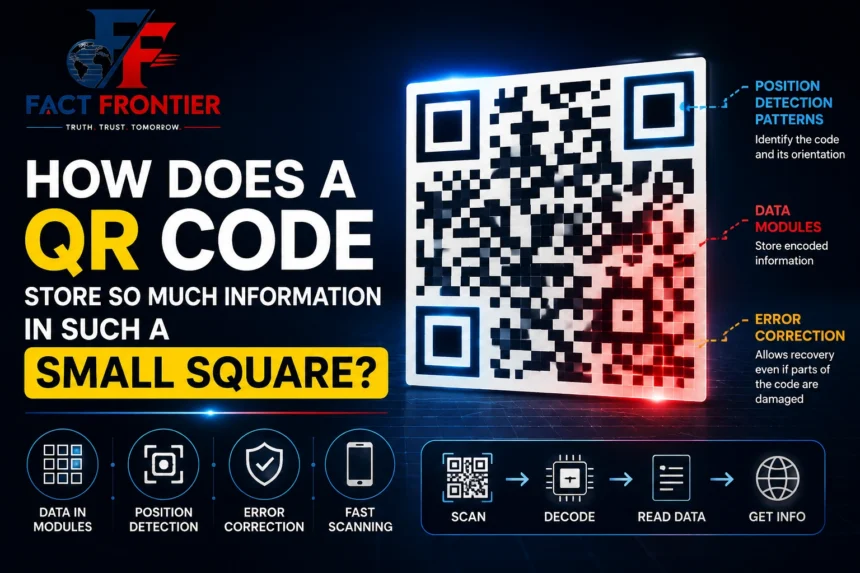
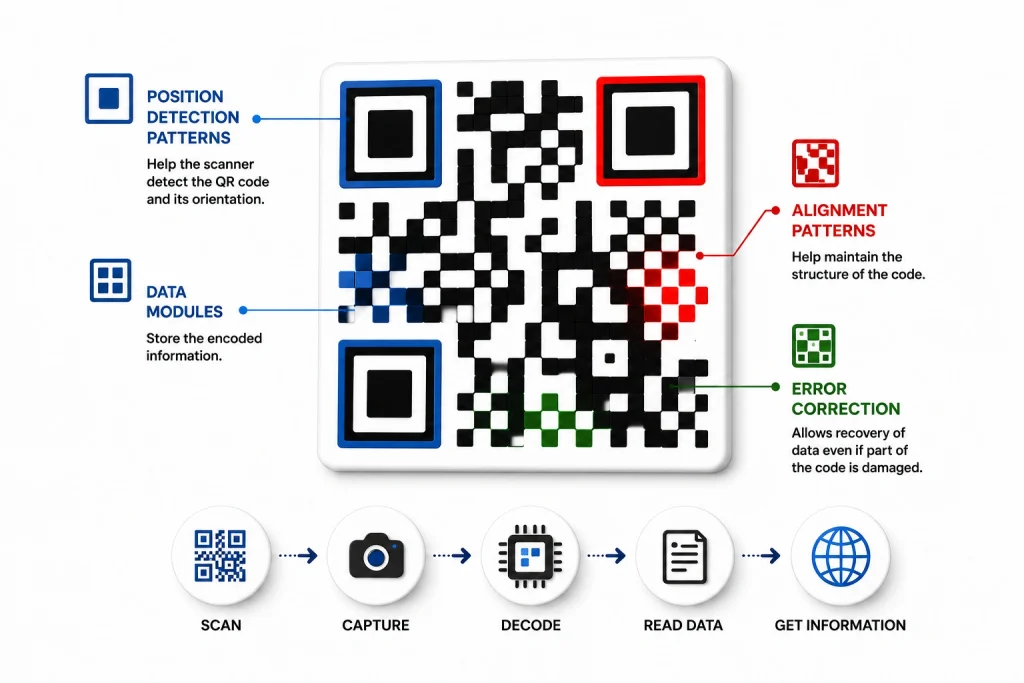
Look closely, and you will notice three large square patterns near three of its corners. These are called position-detection patterns. They help the scanning system identify the QR code and determine its orientation.
This is why you don’t have to hold your phone perfectly straight. The code can be tilted, rotated, or viewed from an angle, and the software can still work out how it is positioned.
The smaller black and white squares are known as modules. They form the main grid in which the encoded information is arranged.
QR codes come in different sizes. The standard system ranges from Version 1, which has a 21 × 21 module grid, to Version 40, which has a 177 × 177 grid. A larger version can accommodate more information, although the final capacity also depends on the type of data and the error-correction level being used.
So the complicated pattern you see has an underlying structure. Every section has a purpose.
Where you explain standard QR grid versions, module dimensions, and encoding specifications.
What Happens When You Point Your Camera at a QR Code?
The scanning process seems almost instantaneous, but several things happen between the moment you point your phone at the code and the moment information appears on the screen.
First, the camera captures an image. The phone’s software then searches that image for the distinctive patterns associated with a QR code. Once it finds them, it determines the code’s position, orientation and perspective.
The software can then begin reading the modules and decoding the information stored in them. If the result is a website address, the phone recognises it as a URL and can offer to open it.
All of this takes place quickly enough that it feels like a single action: point, scan and open.
But behind that simple experience are image processing, pattern recognition, data decoding and error correction working together.
The Black and White Blocks Are Not Random
One of the easiest mistakes is to think that each black or white square directly represents a letter or number. The process is more organised than that.
Before information becomes a QR code, the original data is converted into a digital form that follows the rules of the QR standard. That data is then arranged across the available modules along with information needed for decoding and error correction.
The result is a pattern that may look meaningless to a person but makes sense to a compatible scanner.
This is also why simply changing a few squares at random can make a QR code unreadable. The position of the modules matters, and the entire pattern has to follow the rules used by the decoding system.
How Can a Damaged QR Code Still Work?
Perhaps the most impressive feature of QR technology is its ability to tolerate some damage.
You may have seen a QR code with a small scratch, a dirty section or even a logo placed over part of its centre—and yet the phone still manages to scan it.
The reason is error correction.
When a QR code is created, additional information is included alongside the original data. If some of the code becomes unreadable, the scanner can use this extra information to reconstruct missing data.
There are four standard error-correction levels: L, M, Q and H. Higher levels provide greater protection against damage, but they also require more space for the additional information.
This creates a trade-off. A QR code designed for greater resistance can survive more damage, but less of its available capacity can be used for the original data.
That is why a small logo can sometimes be placed in the centre of a QR code without preventing it from working. However, error correction is not unlimited. If too much of the pattern is damaged or covered, the missing information may no longer be recoverable.
How Much Information Can a QR Code Hold?
There is no single answer because the capacity depends on several factors, including the QR version, the type of data, and the selected error-correction level.
A short web address may fit comfortably into a relatively small QR code. More data requires more modules and potentially a larger version.
The largest standard QR code, Version 40, can hold thousands of characters under suitable conditions.
But there is an important detail that often gets overlooked: the QR code usually does not contain the entire thing you access after scanning it.
Consider a restaurant menu. You scan the QR code, and a complete menu opens on your phone. It might seem as though the entire menu was stored inside that tiny square.
Usually, that is not what happens.
The QR code may simply contain the web address of the restaurant’s online menu. Your phone reads the address and then connects to the internet to retrieve the actual page.
That is how a tiny printed code can lead to something much larger, such as a website, online form, digital ticket, or payment page.
Why Do Some QR Codes Look Much More Complicated Than Others?
If you compare different QR codes, you will notice that some have relatively large, easy-to-see squares while others appear densely packed with tiny modules.
The difference usually comes down to the amount of information being stored and the QR version being used.
A short URL doesn’t require as much space as a longer string of data. As the amount of information increases, more modules are needed, and the pattern becomes denser.
Error correction also affects the design. A higher level of protection requires additional information to be included in the code, leaving less room for the original data.
So creating a QR code involves balancing several things: how much information needs to be stored, how large the code should be, and how much damage it should be able to tolerate.
Why Did QR Codes Become So Popular?
The original technology was designed for industrial use, but several characteristics made QR codes useful almost everywhere.
They are inexpensive to print, require relatively little space, and can be read using a camera. Once smartphones became capable of recognising QR codes easily, there was no longer a need for specialised equipment in many everyday situations.
Businesses could place a code on a poster and send customers to a website. Event organisers could use one on a ticket. Restaurants could provide digital menus. Manufacturers could add product information to packaging.
The same basic technology could serve all of these purposes.
The growth of smartphones was therefore an important part of the QR code’s journey from an industrial tracking system to something most people encounter almost every day.
A Small Square With a Lot of Engineering Behind It
A QR code looks simple because the complexity has been compressed into its design.
The large patterns help a camera find and orient the code. The smaller modules carry organised digital information. Error-correction data helps recover information when part of the pattern cannot be read. Different versions provide different amounts of space for data.
None of this is obvious when you look at the finished square.
That is perhaps what makes the technology so interesting. Something that looks like a collection of random black and white boxes is actually a carefully designed system for moving information from the physical world into a digital device.
The idea began in Japanese automobile factories in 1994. Today, the same technology appears on restaurant tables, tickets, products, advertisements and phone screens around the world.
The next time you scan a QR code, it is worth remembering what is happening behind that simple gesture. Your camera is recognising a structured pattern, the software is interpreting its modules, error-correction systems are checking the data, and the resulting information is being turned into something your phone can use.
It may look like nothing more than a small black-and-white square. But inside that square is a carefully organised bridge between the physical world and the digital one.
Frequently Asked Questions (FAQs)
1. What does “QR” stand for, and who created it? QR stands for “Quick Response.” It was invented in 1994 by Masahiro Hara and his team at the Japanese company Denso Wave to track auto parts on assembly lines faster than standard barcodes.
2. How do QR codes store so much more data than traditional barcodes? Traditional linear barcodes store information horizontally in a single row of lines. QR codes are two-dimensional (2D), storing data both horizontally and vertically across a grid of black and white squares (modules), which drastically increases storage capacity.
3. What is the maximum amount of data a QR code can hold? Data capacity depends on the version (grid size) and the type of data stored. The largest standard size (Version 40, a 177×177 grid) can hold up to:
- Numeric data only: 7,089 characters
- Alphanumeric data: 4,296 characters
- Binary (8-bit) data: 2,953 bytes
- Kanji/Kana: 1,817 characters
4. Why do QR codes have three big squares in the corners? Those three squares are position-detection patterns (finder patterns). They tell the scanner where the code starts, which way is up, and how it is tilted, allowing your phone camera to read the code from almost any angle.
5. How can a damaged or scratched QR code still scan? QR codes use built-in Reed-Solomon error correction. Extra backup data is woven into the code when it is generated, allowing a scanner to reconstruct lost information even if up to 30% of the code is dirty, scratched, or covered by a logo.
6. Does a QR code directly store the full website or menu? Usually, no. In most everyday cases, the QR code only stores a short text string or a URL. When your phone scans the code, it reads that web address and uses your internet connection to load the full website, digital menu, or payment portal.
7. Why do some QR codes look denser and more complex than others? A QR code’s density depends on two things: the amount of data stored and the error-correction level selected. More characters or higher damage resistance requires more modules, resulting in a tighter, more complex grid pattern.
Also Read: – Why Do Computers Use Only 0 and 1? The Basics of Binary Code
📚 Verified Research Sources & Fact-Checking Citations
At FactFrontier, every claim is cross-referenced with primary scientific databases, institutional research archives, and verified historical records:
- IEEE Xplore Digital Library: Peer-reviewed computing, telecommunications, and sensor architectures.
- ACM (Association for Computing Machinery): Foundational computer science and network engineering archives.
- MIT Technology Review & Standards Laboratories: Emerging hardware and software benchmark assessments.