
We use Wi-Fi almost every day without giving much thought to how it works.
You connect your phone to a Wi-Fi network, open Instagram, watch YouTube, send a WhatsApp message or download a file. There is no cable connected to your phone, yet information travels between your device and the internet in seconds.
This can make Wi-Fi seem almost invisible or even a little magical.
But Wi-Fi is not magic. It is a technology that uses radio waves to send information through the air.
So, how does Wi-Fi actually work?
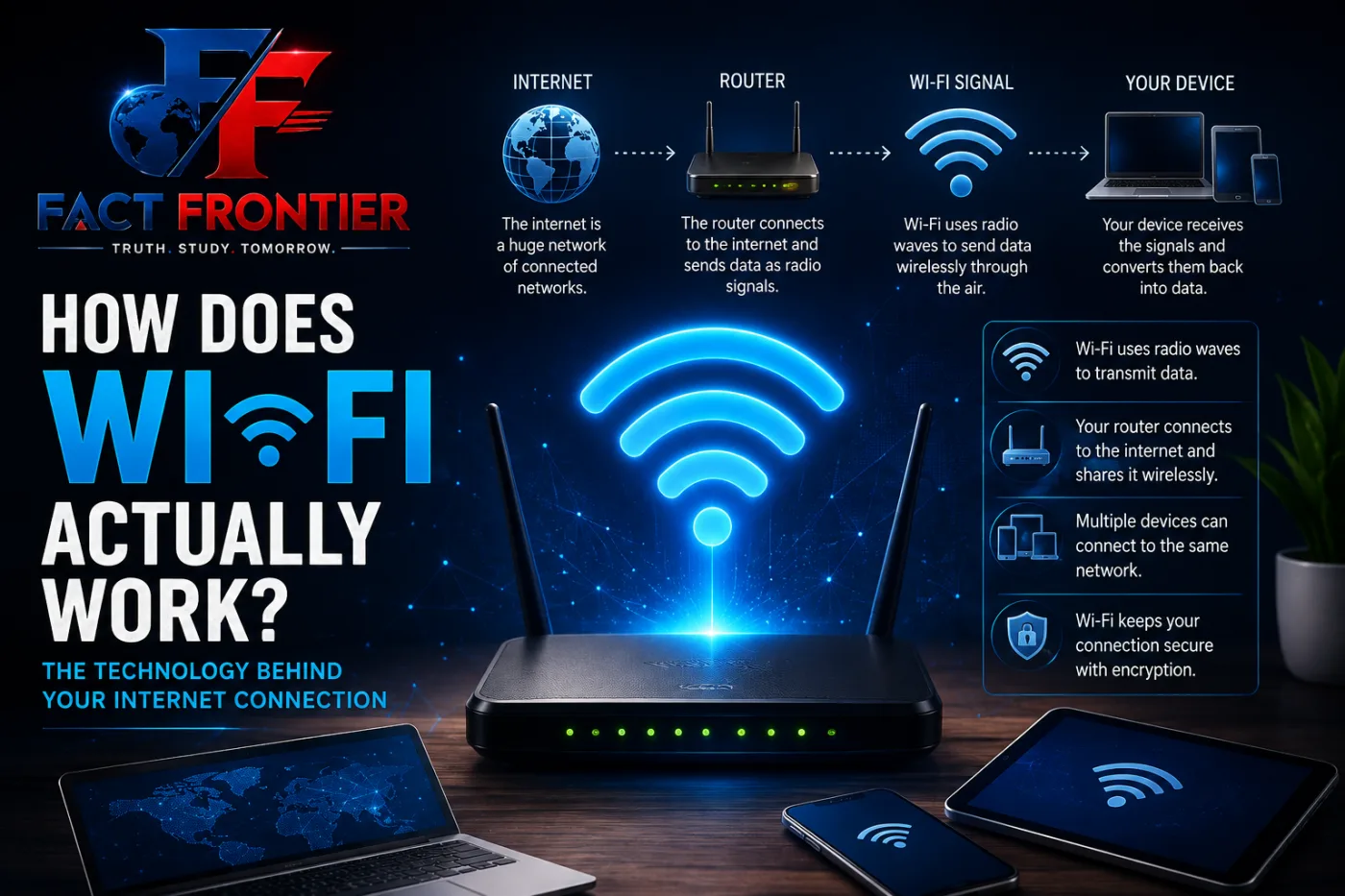
The basic idea is surprisingly simple. Your router receives information from the internet and converts that information into radio signals. Your phone, laptop or other device receives those signals and converts them back into information that the device can understand.
Let’s break down what happens behind the scenes.
What Is Wi-Fi and How Does Wi-Fi Actually Work?
Wi-Fi is a wireless communication technology that allows devices to exchange data without needing a physical network cable.
The word Wi-Fi is commonly used to describe wireless networking based on the IEEE 802.11 family of standards.
Unlike mobile networks, which connect your phone to a cellular tower, Wi-Fi usually connects your device to a nearby wireless router or access point.
The router then connects to another network, usually through your internet service provider.
So when you use Wi-Fi, there are actually two different connections involved:
Your device → Wi-Fi router → Internet
Wi-Fi handles the wireless connection between your device and the router. The router then handles the connection between your local network and the wider internet.
Your Router Is More Than Just a Box
A Wi-Fi router may look like a simple device sitting on a table, but it performs several jobs.
First, it communicates wirelessly with your devices.
Second, it connects your home network to your internet service provider.
Third, it manages the traffic between different devices connected to the network.
For example, imagine that your phone is watching a video while your laptop is downloading a file. Both devices are using the same router, but the router helps manage the data going to and coming from each device.
That is why you can connect multiple phones, laptops, TVs and other devices to the same Wi-Fi network.
How Does Wi-Fi Send Information Through the Air?
This is where radio waves come into the picture.
Wi-Fi uses electromagnetic radio waves to carry data. These waves travel through the air and allow your device and router to communicate without a physical cable between them.
But the router cannot simply send a message saying, “Here is your video.”
Digital information is represented as bits, basically 0s and 1s. Wi-Fi technology converts these bits into carefully controlled changes in radio signals.
Your device detects those changes and converts them back into digital data.
The whole process happens extremely quickly.
A simple example
Suppose you open a website on your phone.
Your phone sends a request through Wi-Fi to the router.
The router sends that request through your internet connection to the appropriate server.
The server sends information back.
That information reaches your router, which sends it wirelessly to your phone.
Your phone then processes the data and displays the webpage on your screen.
All of this can happen in a fraction of a second.
Why Does Wi-Fi Have Different Frequencies?
You may have noticed that some routers show networks such as 2.4 GHz and 5 GHz. Modern Wi-Fi can also use the 6 GHz band with newer Wi-Fi standards.
These numbers describe radio-frequency bands used for Wi-Fi communication.
The different bands have different characteristics.
The 2.4 GHz band can generally travel farther and pass through walls better, but it is also more crowded because many other devices use this band.
The 5 GHz band can provide higher speeds and has more available channels, but its signals generally do not travel through obstacles as effectively as 2.4 GHz signals.
The newer 6 GHz band provides additional spectrum for compatible devices, which can help with capacity and reduce congestion in suitable environments.
So a higher frequency does not automatically mean “better” in every situation. The best choice depends on distance, walls, interference and the devices being used.
Why Does Wi-Fi Become Slow When You Move Away?
Have you ever noticed that Wi-Fi works perfectly near the router but becomes weaker in another room?
Distance is one reason.
As radio signals travel farther from the router, the signal reaching your device becomes weaker.
Walls, floors, furniture and other objects can also affect the signal.
Some materials absorb or weaken radio signals more than others. Thick walls and certain building materials can make wireless communication more difficult.
There is also another problem: interference.
Other nearby Wi-Fi networks and electronic devices can sometimes compete for the same radio spectrum.
This is one reason why Wi-Fi performance can change depending on where you are inside a building.
How Can Wi-Fi Handle Many Devices at Once?
A modern Wi-Fi network may have several devices connected at the same time.
Your phone might be browsing the internet, someone else might be watching a video, a smart TV could be streaming content and a laptop might be downloading a file.
Wi-Fi standards include technologies that help manage communication between multiple devices.
Newer generations of Wi-Fi introduced techniques such as MU-MIMO and OFDMA, which can make communication more efficient when many devices are using the network.
Instead of treating every device in exactly the same way, modern Wi-Fi can divide wireless resources more efficiently.
This becomes especially useful in crowded networks such as homes, schools, offices and public places.
What Does the Wi-Fi Symbol Actually Mean?
The familiar Wi-Fi symbol on your phone is simply an indicator that your device has a wireless network connection.
The curved lines in the symbol are not showing the actual radio waves traveling through the room.
They are just a visual representation of a wireless connection.
Your device constantly communicates with the network in the background. Depending on the device and operating system, the Wi-Fi icon may also give you a rough idea of signal strength.
A strong Wi-Fi signal, however, does not always guarantee fast internet.
Your internet plan, network congestion, router performance, server speed and other factors can also affect how quickly things load.
Is Wi-Fi the Same as the Internet?
No.
This is one of the most common misunderstandings about Wi-Fi.
Wi-Fi and the internet are two different things.
Wi-Fi is the wireless connection between your device and a local network.
The internet is a huge global network of connected networks and devices.
You can actually have Wi-Fi without internet access.
For example, your phone may successfully connect to a router even when the router’s internet connection is down. Your device will still show that it is connected to Wi-Fi, but websites and online services may not work.
This is why your phone can sometimes say “Connected to Wi-Fi” while still telling you that there is no internet connection.
What Happens When You Type a Website Address?
Let’s follow one simple example.
You open your browser and enter a website address.
Your phone first communicates with the router over Wi-Fi.
The router then sends the request through your internet connection.
The request eventually reaches the server responsible for the website.
The server sends data back through the internet.
That data reaches your router, travels through the air as Wi-Fi signals and is received by your phone.
Your browser then puts all those pieces together and displays the webpage.
You may see the final page almost instantly, but several steps have happened before it appears on your screen.
Wi-Fi Has Changed a Lot Over Time
Wi-Fi has been around for decades, but it has continued to improve.
Different generations have introduced better speeds, improved efficiency, support for more devices and better performance in crowded environments.
You may have heard names such as Wi-Fi 4, Wi-Fi 5, Wi-Fi 6, Wi-Fi 6E and Wi-Fi 7.
These names represent different generations of Wi-Fi technology.
The goal has remained largely the same: move more information between devices wirelessly, more efficiently and with less delay.
The Invisible Network Around You
The next time you connect your phone to Wi-Fi, remember that there is much more happening than just a small icon appearing on your screen.
Your router is sending and receiving radio signals.
Your phone is constantly interpreting those signals and turning them into digital information.
Data is moving between your device, the router and the wider internet, all without a physical cable connecting your phone to the network.
Wi-Fi feels invisible because we cannot see radio waves.
But they are carrying the information that lets us browse websites, stream videos, play online games, send messages and connect our devices every day.
What looks like a simple wireless connection is actually a carefully designed system of radio communication, networking and data processing working together in the background.
Also Read- Why Do Computers Use Only 0 and 1? The Basics of Binary Code
We use Wi-Fi almost every day without giving much thought to how it works.
You connect your phone to a Wi-Fi network, open Instagram, watch YouTube, send a WhatsApp message or download a file. There is no cable connected to your phone, yet information travels between your device and the internet in seconds.
This can make Wi-Fi seem almost invisible or even a little magical.
But Wi-Fi is not magic. It is a technology that uses radio waves to send information through the air.
So, how does Wi-Fi actually work?
The basic idea is surprisingly simple. Your router receives information from the internet and converts that information into radio signals. Your phone, laptop or other device receives those signals and converts them back into information that the device can understand.
Let’s break down what happens behind the scenes.
What Is Wi-Fi and How Does Wi-Fi Actually Work?
Wi-Fi is a wireless communication technology that allows devices to exchange data without needing a physical network cable.
The word Wi-Fi is commonly used to describe wireless networking based on the IEEE 802.11 family of standards.
Unlike mobile networks, which connect your phone to a cellular tower, Wi-Fi usually connects your device to a nearby wireless router or access point.
The router then connects to another network, usually through your internet service provider.
So when you use Wi-Fi, there are actually two different connections involved:
Your device → Wi-Fi router → Internet
Wi-Fi handles the wireless connection between your device and the router. The router then handles the connection between your local network and the wider internet.
Your Router Is More Than Just a Box
A Wi-Fi router may look like a simple device sitting on a table, but it performs several jobs.
First, it communicates wirelessly with your devices.
Second, it connects your home network to your internet service provider.
Third, it manages the traffic between different devices connected to the network.
For example, imagine that your phone is watching a video while your laptop is downloading a file. Both devices are using the same router, but the router helps manage the data going to and coming from each device.
That is why you can connect multiple phones, laptops, TVs and other devices to the same Wi-Fi network.
How Does Wi-Fi Send Information Through the Air?
This is where radio waves come into the picture.
Wi-Fi uses electromagnetic radio waves to carry data. These waves travel through the air and allow your device and router to communicate without a physical cable between them.
But the router cannot simply send a message saying, “Here is your video.”
Digital information is represented as bits, basically 0s and 1s. Wi-Fi technology converts these bits into carefully controlled changes in radio signals.
Your device detects those changes and converts them back into digital data.
The whole process happens extremely quickly.
A simple example
Suppose you open a website on your phone.
Your phone sends a request through Wi-Fi to the router.
The router sends that request through your internet connection to the appropriate server.
The server sends information back.
That information reaches your router, which sends it wirelessly to your phone.
Your phone then processes the data and displays the webpage on your screen.
All of this can happen in a fraction of a second.
Why Does Wi-Fi Have Different Frequencies?
You may have noticed that some routers show networks such as 2.4 GHz and 5 GHz. Modern Wi-Fi can also use the 6 GHz band with newer Wi-Fi standards.
These numbers describe radio-frequency bands used for Wi-Fi communication.
The different bands have different characteristics.
The 2.4 GHz band can generally travel farther and pass through walls better, but it is also more crowded because many other devices use this band.
The 5 GHz band can provide higher speeds and has more available channels, but its signals generally do not travel through obstacles as effectively as 2.4 GHz signals.
The newer 6 GHz band provides additional spectrum for compatible devices, which can help with capacity and reduce congestion in suitable environments.
So a higher frequency does not automatically mean “better” in every situation. The best choice depends on distance, walls, interference and the devices being used.
Why Does Wi-Fi Become Slow When You Move Away?
Have you ever noticed that Wi-Fi works perfectly near the router but becomes weaker in another room?
Distance is one reason.
As radio signals travel farther from the router, the signal reaching your device becomes weaker.
Walls, floors, furniture and other objects can also affect the signal.
Some materials absorb or weaken radio signals more than others. Thick walls and certain building materials can make wireless communication more difficult.
There is also another problem: interference.
Other nearby Wi-Fi networks and electronic devices can sometimes compete for the same radio spectrum.
This is one reason why Wi-Fi performance can change depending on where you are inside a building.
How Can Wi-Fi Handle Many Devices at Once?
A modern Wi-Fi network may have several devices connected at the same time.
Your phone might be browsing the internet, someone else might be watching a video, a smart TV could be streaming content and a laptop might be downloading a file.
Wi-Fi standards include technologies that help manage communication between multiple devices.
Newer generations of Wi-Fi introduced techniques such as MU-MIMO and OFDMA, which can make communication more efficient when many devices are using the network.
Instead of treating every device in exactly the same way, modern Wi-Fi can divide wireless resources more efficiently.
This becomes especially useful in crowded networks such as homes, schools, offices and public places.
What Does the Wi-Fi Symbol Actually Mean?
The familiar Wi-Fi symbol on your phone is simply an indicator that your device has a wireless network connection.
The curved lines in the symbol are not showing the actual radio waves traveling through the room.
They are just a visual representation of a wireless connection.
Your device constantly communicates with the network in the background. Depending on the device and operating system, the Wi-Fi icon may also give you a rough idea of signal strength.
A strong Wi-Fi signal, however, does not always guarantee fast internet.
Your internet plan, network congestion, router performance, server speed and other factors can also affect how quickly things load.
Is Wi-Fi the Same as the Internet?
No.
This is one of the most common misunderstandings about Wi-Fi.
Wi-Fi and the internet are two different things.
Wi-Fi is the wireless connection between your device and a local network.
The internet is a huge global network of connected networks and devices.
You can actually have Wi-Fi without internet access.
For example, your phone may successfully connect to a router even when the router’s internet connection is down. Your device will still show that it is connected to Wi-Fi, but websites and online services may not work.
This is why your phone can sometimes say “Connected to Wi-Fi” while still telling you that there is no internet connection.
What Happens When You Type a Website Address?
Let’s follow one simple example.
You open your browser and enter a website address.
Your phone first communicates with the router over Wi-Fi.
The router then sends the request through your internet connection.
The request eventually reaches the server responsible for the website.
The server sends data back through the internet.
That data reaches your router, travels through the air as Wi-Fi signals and is received by your phone.
Your browser then puts all those pieces together and displays the webpage.
You may see the final page almost instantly, but several steps have happened before it appears on your screen.
Wi-Fi Has Changed a Lot Over Time
Wi-Fi has been around for decades, but it has continued to improve.
Different generations have introduced better speeds, improved efficiency, support for more devices and better performance in crowded environments.
You may have heard names such as Wi-Fi 4, Wi-Fi 5, Wi-Fi 6, Wi-Fi 6E and Wi-Fi 7.
These names represent different generations of Wi-Fi technology.
The goal has remained largely the same: move more information between devices wirelessly, more efficiently and with less delay.
The Invisible Network Around You
The next time you connect your phone to Wi-Fi, remember that there is much more happening than just a small icon appearing on your screen.
Your router is sending and receiving radio signals.
Your phone is constantly interpreting those signals and turning them into digital information.
Data is moving between your device, the router and the wider internet, all without a physical cable connecting your phone to the network.
Wi-Fi feels invisible because we cannot see radio waves.
But they are carrying the information that lets us browse websites, stream videos, play online games, send messages and connect our devices every day.
What looks like a simple wireless connection is actually a carefully designed system of radio communication, networking and data processing working together in the background.
Also Read- Why Do Computers Use Only 0 and 1? The Basics of Binary Code
📚 Verified Research Sources & Fact-Checking Citations
At FactFrontier, every claim is cross-referenced with primary scientific databases, institutional research archives, and verified historical records:
- IEEE Xplore Digital Library: Peer-reviewed computing, telecommunications, and sensor architectures.
- ACM (Association for Computing Machinery): Foundational computer science and network engineering archives.
- MIT Technology Review & Standards Laboratories: Emerging hardware and software benchmark assessments.