
The Science Behind Your Fingertip: Ridges, Valleys, and Minutiae
If you have When observing how fingerprint sensors work in your phone, the answer comes down to microscopic ridges, electrical circuits, and encrypted biometric math. Unlocking a phone can take less than a second.
You simply place your finger on a sensor, and your phone knows whether it is you. There is no password to type and no button asking you to prove your identity.
But how can a small sensor recognize something as unique as your fingerprint?
The answer is a combination of sensors, image or pattern analysis, and a secure system that compares the fingerprint you provide with information stored on your device.
It may seem like the phone is simply taking a picture of your finger, but the process is a little more complicated than that.
Your Fingerprint Is Full of Patterns
Look closely at your fingertip, and you will see tiny lines and curves.
These patterns form what we commonly call a fingerprint. The overall pattern is different from person to person, and even fingers on the same hand can have different fingerprints.
Fingerprint sensors use these patterns to create a representation of your fingerprint.
They do not need to understand your entire fingerprint like a human would. Instead, the system looks for important characteristics and patterns that can help distinguish one fingerprint from another.
These small details are useful because a fingerprint is much more complex than it appears at first glance.
First, You Have to Register Your Finger
Before your phone can recognize your fingerprint, you usually have to set it up.
During setup, the phone asks you to place your finger on the sensor several times.
You may be asked to slightly change the position of your finger each time. This allows the sensor to capture different parts of the fingerprint instead of relying on just one small area.
The phone then processes this information and creates a digital representation, often called a fingerprint template.
This template is what the phone uses later when you try to unlock it.
Your Phone Usually Doesn’t Store a Normal Fingerprint Photo
This is an important difference.
When you register your fingerprint, the phone does not simply save a normal photograph of your finger and compare photographs every time.
Instead, the fingerprint information is processed into data that can be used for matching.
The exact way this information is handled depends on the device and its security system.
This is one reason fingerprint authentication is not simply the same as keeping a photo of your finger in your gallery.
How Does the Sensor Actually See Your Finger?
Not every fingerprint sensor works in the same way.
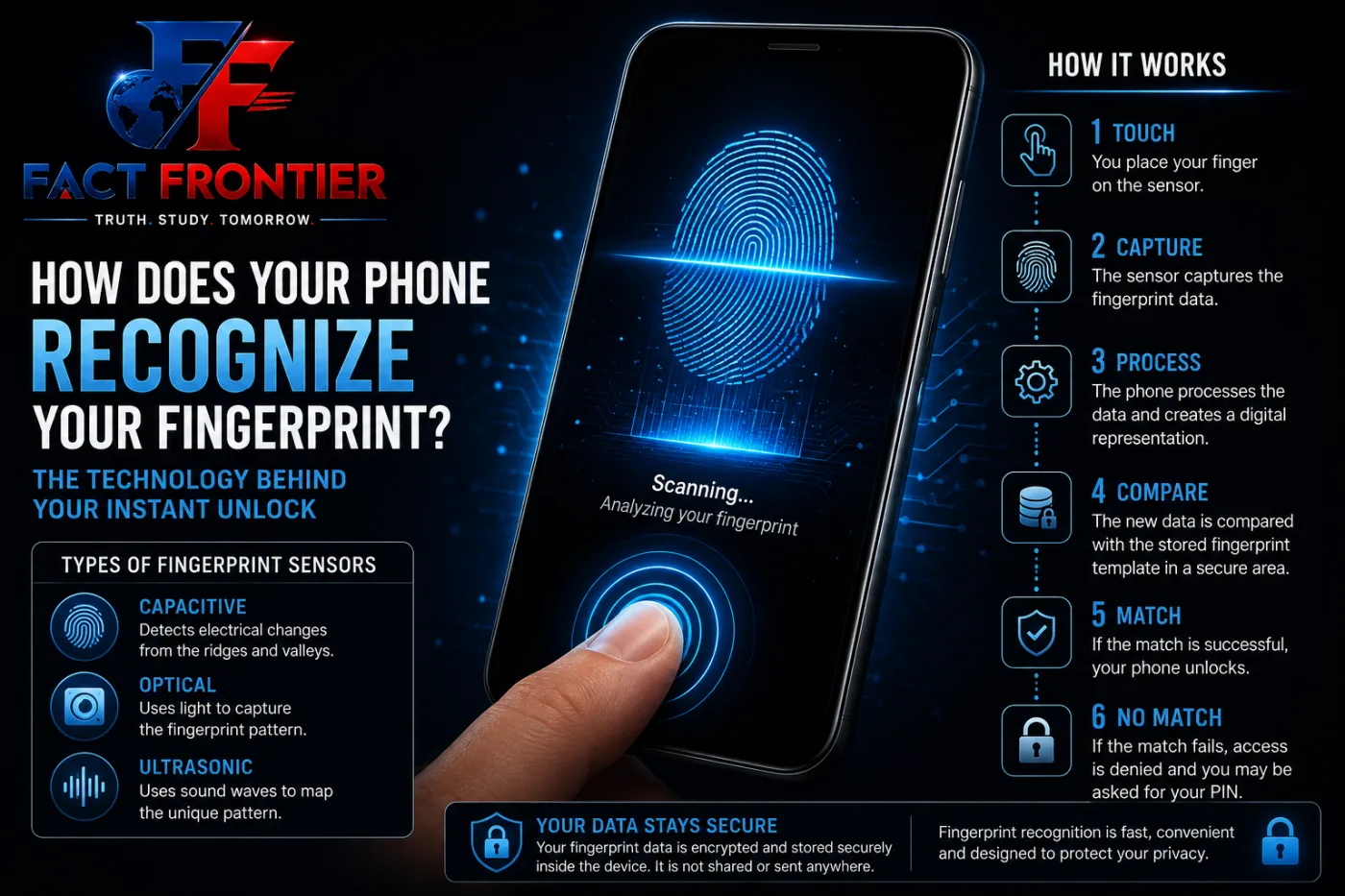
There are several types of fingerprint sensors, but smartphones commonly use capacitive or optical technology. Some newer devices also use ultrasonic sensors.
Each type approaches the problem differently.
Capacitive fingerprint sensors
Capacitive sensors detect differences in electrical properties across the surface of your finger.
The ridges and valleys of your fingerprint interact with the sensor differently, allowing the system to build a representation of the fingerprint pattern.
This is somewhat similar to the basic principle behind a capacitive touchscreen, although fingerprint sensors are designed specifically for biometric detection.
Optical fingerprint sensors
Optical sensors use light to capture an image or representation of the fingerprint pattern.
The sensor detects differences between the ridges and spaces of the fingerprint and uses that information for matching.
Some smartphones place optical fingerprint sensors underneath the display, allowing you to touch a specific area of the screen instead of a separate physical sensor.
Ultrasonic fingerprint sensors
Ultrasonic systems use sound waves at frequencies above the range humans can normally hear.
The sensor sends ultrasonic waves toward the finger and measures how they interact with the fingerprint surface.
This information can then be used to create a representation of the fingerprint.
What Happens When You Touch the Sensor?
Suppose you have already registered your fingerprint and now place your finger on the sensor.
Several things happen very quickly.
First, the sensor detects your finger.
Then it captures or measures the fingerprint pattern using its particular sensing technology.
The phone processes the information and looks for important characteristics in the fingerprint.
Finally, the system compares the newly captured information with the stored fingerprint template.
All of this can happen very quickly, which is why fingerprint unlocking feels almost instant.
What If Your Finger Is Wet or Dirty?
Fingerprint sensors do not always work perfectly.
Water, sweat, dirt, or other substances on your finger can interfere with the sensor’s ability to detect the fingerprint properly.
The condition of the sensor itself can also matter.
For example, if the sensor surface is dirty or your finger is positioned differently from how it was during registration, the phone may have more difficulty getting a good reading.
This does not necessarily mean that your fingerprint has changed. It simply means that the sensor may not have received enough useful information for a successful match.
Why Does the Phone Sometimes Ask for Your PIN?
You may have noticed that your phone occasionally refuses to use your fingerprint and asks for your PIN, password, or passcode instead.
This is an intentional security feature.
Biometric authentication is convenient, but phones also need a stronger backup method.
Depending on the device and its security rules, you may be required to enter your passcode after certain events, such as restarting the phone or after a period of time.
The exact rules vary between devices and operating systems.
This creates a balance between convenience and security.
Can Two People Have the Same Fingerprint?
Fingerprints are widely used for identification because their patterns are highly distinctive.
Even identical twins can have different fingerprints.
However, fingerprint recognition is not a magical system that knows with absolute certainty who someone is.
A phone is performing a biometric match. It checks whether the fingerprint it has just detected is sufficiently similar to the enrolled template.
The system is designed to make unauthorized access difficult while still allowing the actual user to unlock the device quickly.
Your Fingerprint Is Not Just for Unlocking
Fingerprint sensors can be used for more than unlocking a phone.
The advantage is simple: instead of remembering another password, you can use a physical characteristic that is always with you.
Of course, fingerprint authentication is not perfect, so important systems often combine it with other security measures.
Fingerprint Recognition Is a Small Security System
The next time your phone unlocks after a quick touch, remember that the sensor is doing much more than simply looking at your finger.
It detects a complex pattern, converts the information into usable data, compares it with a protected template, and makes an authentication decision in a very short time.
The whole process happens quietly in the background.
That is what makes fingerprint technology interesting. Something as ordinary as the tiny lines on your fingertip can become a useful digital key for accessing a device.
You don’t have to remember it, type it, or carry it.
You simply have it with you.
Frequently Asked Questions
Q1. Does my phone store an actual picture of my fingerprint?
No. Your phone never saves a standard image file (like a JPEG or PNG) of your print. Instead, it maps coordinate points of unique ridge patterns—known as minutiae—and converts them into an encrypted mathematical template.
Q2. Can someone steal my fingerprint data from my phone?
It is extremely difficult. Modern mobile operating systems process and store biometric data in an isolated, hardware-level secure enclave or Trusted Execution Environment (TEE). Apps and the main operating system never access the raw data; they only receive a binary “match” or “no match” signal.
Q3. Which is better: an optical or an ultrasonic fingerprint sensor?
Ultrasonic sensors are generally superior in security and reliability. While optical scanners take a 2D photograph using reflected screen light, ultrasonic sensors bounce high-frequency sound waves off your skin to construct a 3D depth map. This makes ultrasonic sensors harder to trick with 2D fake prints and more reliable when your fingers are damp.
Q4. Why doesn’t the scanner work when my fingers are wet or sweaty?
Water and moisture distort the reading. For capacitive sensors, water conducts electricity and bridges the tiny capacitor gaps, muddying the charge differences. For optical sensors, water droplets refract and scatter the light, causing a blurred reading.
Q5. Can a dead finger or a photograph unlock my phone?
No. Standard 2D photos lack the physical texture and electrical properties required by phone scanners. Capacitive and ultrasonic scanners require electrical conductivity or 3D depth, which eliminates simple photo spoofing. Furthermore, many sensors check for pulse, surface capacitance, or skin reflectivity to verify that the finger is living.
Q6. Why does my phone force me to enter a PIN after restarting?
This is a standard security protocol known as a “cold boot” lockout. When a phone powers off or reboots, the encryption keys stored in memory are purged. Until you enter your primary passcode or PIN, the secure enclave remains locked, preventing automated bypass tools from abusing biometric hardware.
Q7. Can two people have the exact same fingerprint?
Mathematically, the odds of two people having identical fingerprints are estimated at roughly 1 in 64 billion. Even identical twins, who share the exact same DNA, develop distinct fingerprints in the womb due to environmental factors like amniotic fluid movement and umbilical cord position.
Also Read: – How Does Your Phone Know Where You Touched the Screen?
📚 Verified Research Sources & Fact-Checking Citations
At FactFrontier, every claim is cross-referenced with primary scientific databases, institutional research archives, and verified historical records:
- IEEE Xplore Digital Library: Peer-reviewed computing, telecommunications, and sensor architectures.
- ACM (Association for Computing Machinery): Foundational computer science and network engineering archives.
- MIT Technology Review & Standards Laboratories: Emerging hardware and software benchmark assessments.