
The Core Principle: Electrical Fields Beneath the Glass
Understanding how smartphone touchscreens work reveals the clever engineering hidden beneath everyday technology. We touch our phones hundreds of times a day, usually without giving the action a second thought. A tap opens an app, a swipe moves through a webpage, two fingers can enlarge a photograph, and a quick touch on a keyboard produces a letter almost instantly.
There are no mechanical buttons underneath most of these actions. Instead, the phone detects what happens on the surface of the display and translates that physical contact into a command.
So, how does it know exactly where you touched?
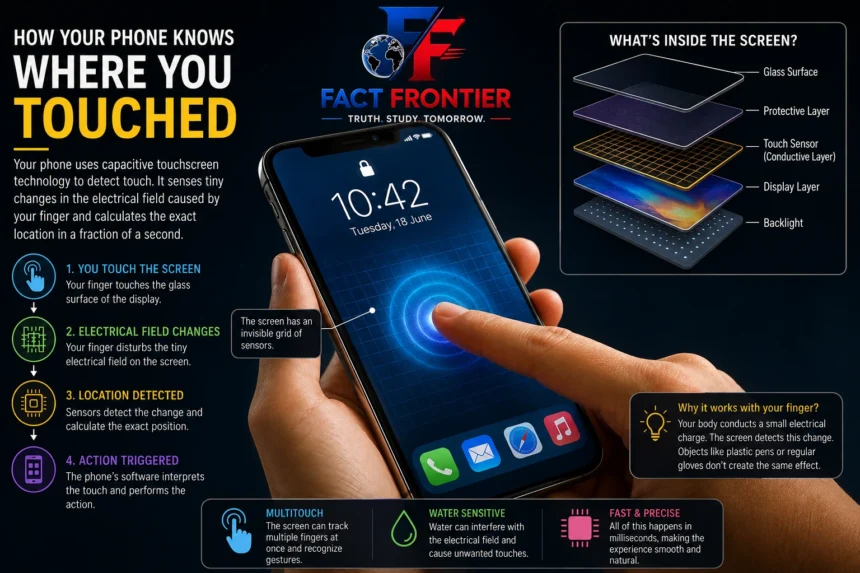
The answer lies in the electronics beneath the glass. Most modern smartphones use capacitive touchscreens, which detect changes in an electrical field when a finger comes close to or touches the display.
It sounds like complicated technology, but the basic principle is surprisingly simple.
Your Finger Changes the Electrical Field
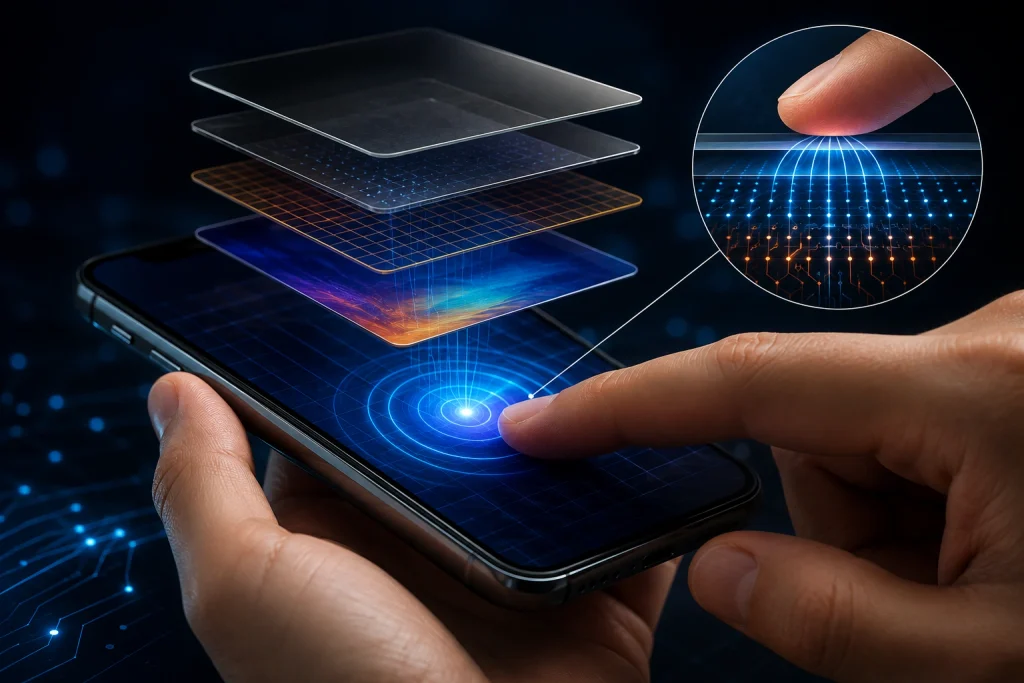
A smartphone display is made up of several layers. Among them is a transparent conductive layer that forms part of the touchscreen’s sensing system. The electronics continuously monitor electrical conditions across the surface.
Your body conducts electricity, and that becomes useful when you touch the screen.
When a finger approaches the display, it changes the electrical field around that particular area. The touchscreen controller measures this change and determines where it occurred. It does not need to recognise your finger as an object or receive a special signal from it. It simply detects a change in the electrical characteristics of the screen.
You can think of the display as having an invisible sensing network beneath its surface. When your finger interacts with one part of that network, the controller can determine the approximate location of the disturbance.
That information is then passed to the phone’s software.
The entire process takes place extremely quickly, which is why a tap feels almost instantaneous.
“Most modern smartphones use capacitive touchscreen technology, which detects changes in an electrical field…”
The Touchscreen Doesn’t Know What You Want
There is an important distinction between detecting a touch and understanding a touch.
The touchscreen itself does not know that you are trying to open YouTube, select a photograph, or type the letter “A.” Its job is much simpler: it detects that a touch has occurred and reports its position.
The operating system decides what that position means.
Suppose you tap near the bottom of the display while the keyboard is open. The touchscreen reports the location of your finger. The operating system checks what is displayed at that position and determines which key has been touched. If the same physical location contains an app icon instead, the result could be completely different.
This is one of the most useful features of a touchscreen. The hardware does not have to change every time you use the phone for a different purpose. The software changes the function of the display.
The same glass surface can become a keyboard, a map, a video control panel, or a game interface depending on what is happening on the screen.
“According to research on the early history of touch interfaces, touch-sensitive displays existed long before smartphones became common.”
Why Doesn’t a Plastic Pen Work?
A capacitive touchscreen responds to changes in its electrical environment. A normal plastic pen does not interact with the screen in the same way as a human finger, so the display generally has nothing to detect.
The same problem can occur with gloves. If the material prevents your finger from producing a sufficient electrical change at the screen, the phone may fail to register the touch.
That is why some winter gloves have conductive material woven into their fingertips. The material allows the electrical interaction needed by the touchscreen to take place.
Capacitive styluses are designed around the same principle. More advanced digital pens go considerably further. They can contain electronics of their own and communicate with the device in ways that allow features such as pressure sensitivity and precise input.
So while a basic touchscreen is looking for an electrical change, sophisticated pen systems can provide the phone with much more information.
“…relies on the natural electrical conductivity of the human body to complete the circuit at the surface level.”
How Can One Screen Detect Two Fingers?
A modern touchscreen is not limited to a single point of contact. Most smartphones can detect several touches at the same time, a feature known as multitouch.
You use it whenever you pinch a photograph to zoom in or out. The screen detects the positions of both fingers and tracks how those positions change. Software then interprets the movement as a particular gesture.
The same principle allows you to swipe through a page, rotate an image, or control a game with several fingers.
Multitouch changed the way people interacted with mobile devices because a single display could provide many different controls without requiring a collection of physical buttons.
Instead of building a separate button for every function, manufacturers could let software decide what the screen should do.
Why Does Water Sometimes Confuse a Touchscreen?
Capacitive touchscreens are sensitive to electrical changes, and that sensitivity can occasionally become a problem.
Water can conduct electricity and alter the electrical conditions across the display. If a screen becomes wet, the touchscreen may detect electrical changes that do not come from an intentional finger touch.
That can produce strange behaviour. A phone may appear to register touches by itself, respond incorrectly, or become less accurate.
The problem does not necessarily mean that the display has been damaged. The touchscreen is simply receiving signals that make it harder to distinguish a deliberate touch from an unwanted electrical change.
Modern smartphones use hardware and software techniques to reduce accidental inputs, but no touchscreen can perfectly eliminate every interference under every condition.
Touchscreens Are Much Older Than Smartphones
It is easy to associate touchscreen technology with modern smartphones, but touch-sensitive displays existed long before the iPhone and Android devices became common.
Touch interfaces have been used in industrial equipment, information kiosks, computers and specialised electronic systems for decades. What smartphones changed was the scale and convenience of the technology.
As touchscreens became capable of handling multiple points of contact with greater accuracy, they became particularly well suited to mobile devices. A large display could replace many physical controls while allowing software developers to create entirely different interfaces for different applications.
Apple’s first iPhone, introduced in 2007, played a major role in making multitouch interaction familiar to millions of consumers. Since then, touchscreens have become a standard part of smartphones and many other consumer devices.
What Happens When You Tap an App?
Consider something as ordinary as opening an app.
You see an icon and place your finger on it. The touchscreen detects the electrical change created by your finger and calculates where the contact occurred. That information is sent to the device’s operating system.
The operating system then checks what is located at that position. If it corresponds to an app icon, the appropriate command is passed to the software. The application starts, and the display changes.
From your perspective, the whole thing happens as one simple action: touch the icon, and the app opens.
Behind the scenes, however, several systems have worked together. The touchscreen hardware detects the contact, the controller processes the signal, the operating system interprets the location, and the application responds.
All of that happens within a very small fraction of a second.
The Screen Is More Than a Piece of Glass
When you look at a smartphone, the display appears to be a flat surface showing photographs, text, and videos. But beneath that visible image is a stack of carefully engineered layers.
The display itself produces the image you see, while separate components are responsible for detecting touch. These systems work alongside the phone’s processor and software to turn physical movements into digital instructions.
That is why the same piece of glass can perform so many different jobs.
While typing, it behaves like a keyboard. When navigating, it becomes a map. During a video, it provides playback controls. In a game, it can turn into a collection of virtual buttons and controls.
The screen does not actually understand what you mean when you touch it. It detects changes, determines their location, and sends that information to the software. The software gives the touch its meaning.
A Tiny Electrical Change Behind Every Tap
The next time you unlock your phone, scroll through a webpage, or tap an app, there is a remarkable piece of engineering beneath that ordinary interaction.
Your finger changes the electrical conditions at the surface of the display. The touchscreen detects that change and determines where it happened. The phone’s software then decides what that touch means and responds accordingly.
It all happens so quickly that the technology disappears from everyday experience.
What feels like a simple touch is actually a conversation between your finger, a thin layer of electronics, a touchscreen controller, and the software running inside the phone.
The glass may look passive, but it is constantly sensing what happens on its surface.
That is the clever part of capacitive touch technology: your phone doesn’t need to understand your finger. It only needs to detect the tiny electrical change your finger creates—and let software take it from there.
Conclusion
The next time you tap your phone, remember that the screen is doing far more than displaying an image. Beneath the glass, a sensitive layer detects tiny changes in the electrical field caused by your finger and sends that information to the phone’s software.
The touchscreen does not know whether you meant to open an app, type a letter, or zoom into a photo. It simply detects where and when you touched. The operating system turns that simple signal into an action.
That is what makes modern touchscreens so useful. A single surface can become a keyboard, a map, a game controller, or a set of buttons, depending on what the software needs. What feels like a simple tap is actually a quick exchange between electronics and software happening almost instantly.
Frequently Asked Questions (FAQs)
Q1: How does a phone pinpoint the exact spot you touched? Beneath the glass display sits a transparent conductive layer running a constant, low-level electrical charge. Because your body naturally conducts electricity, touching the glass absorbs a tiny amount of this charge at that specific point. Sensors continuously calculate the exact coordinates where the electrical field changed and pass that position straight to the operating system.
Q2: Why don’t plastic pens, fingernails, or pencils register on the screen? Modern smartphones use capacitive displays, which only react to conductive materials that can alter an electrical field. Plastic, wood, and fingernails are electrical insulators. Touching the glass with them causes no electrical disturbance, leaving the screen sensors with nothing to detect.
Q3: Why doesn’t the touchscreen work when wearing regular winter gloves? Thick fabrics like wool, fleece, and leather block the electrical transfer between your skin and the glass. Touchscreen-compatible gloves work because manufacturers weave conductive metallic threads directly into the fingertips, bridging the electrical gap.
Q4: Why does water cause erratic “ghost touches” on a phone display? Water conducts electricity. Droplets sitting on the glass distort the screen’s electrostatic field in the exact same way a finger does. The controller mistakes those random electrical disruptions for deliberate taps, causing erratic inputs or apps opening on their own.
Q5: How does multitouch work for pinch-to-zoom and gestures? The conductive layer beneath the glass is built as a fine grid of rows and columns. Rather than reading the entire screen as one sensor, the controller scans every intersection independently. This lets the phone track multiple contact points at the same time and translate their moving distance into gestures like pinch, rotate, or swipe.
Also Read: – The Internet Is Not Actually Wireless: Most of It Travels Under the Ocean
How Does Your Phone Know Where You Are? The Science Behind GPS
📚 Verified Research Sources & Fact-Checking Citations
At FactFrontier, every claim is cross-referenced with primary scientific databases, institutional research archives, and verified historical records:
- Nature & Scientific American Archives: Peer-reviewed science and interdisciplinary research publications.
- Encyclopaedia Britannica & Academic Repositories: Verified historical and encyclopedic reference data.
- Global Scientific Fact-Checking Networks: Primary institutional datasets and peer-reviewed literature.